
APLD Learner ID Instructions
New this year, each seat request must be accompanied by an active ADE Professional Learning & Development (APLD) Learner ID. This number is required to confirm the APLD account that will be associated with the payment for each seat request.
If you do not have an APLD account, you will first have to create your APLD account. If you already have an APLD account but need help accessing your account, please check the APLD FAQs page or request your APLD account password.
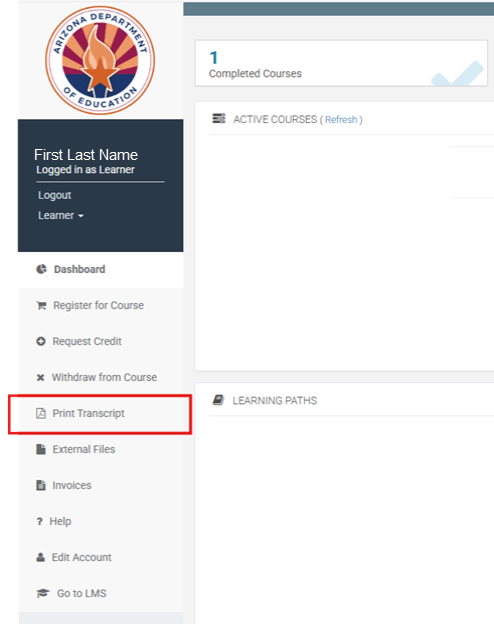
To locate your APLD Learner ID, please follow these steps:
NOTE: Depending on when you last signed into your account, you may first be required to update your account information, e.g., LEA, dietary needs, accommodations, etc. These required updates will be displayed on your screen, and you will be unable to access other features of APLD until account details have been reviewed, updated (if needed), and saved.
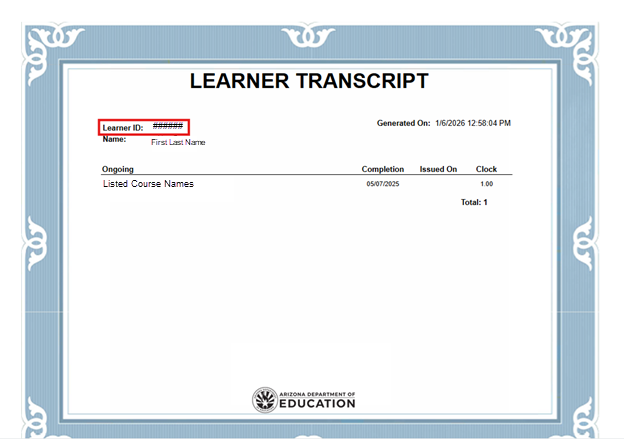
3. Once the Learner Transcript opens, locate the Learner ID in the top left of the transcript:
4. Please keep a record of your Learner ID. You will be required to submit this number with your seat request.
IMPORTANT: Please record and enter this number accurately, as it will be used to reconcile your seat request with your APLD payment. If we are unable to match your seat request with a corresponding payment, your request may be delayed or denied.
We recommend saving a PDF copy of your Learner Transcript so you can reference it when submitting your seat request.