Path
assessment
Contact
Contact name or title
Testing Inbox
Contact phone number
(602) 542-5031
Contact email address
Contact name or title
AASA Inbox
Contact email address
Contact name or title
AZELLA Inbox
Contact email address
Contact name or title
AzSCI Inbox
Contact email address
Contact name or title
Alternate Assessment Inbox
Contact email address
Contact name or title
NAEP Inbox
Contact email address
Achievement Special Paper Version (SPV) Request Form - Spring 2023
Achievement Special Paper Version (SPV) Request Form - Spring 2023
Assessment Educator Committee Application
Assessment Educator Committee Application
Alt ELPA (Alternate English Language Proficiency Assessment)
Alt ELPA (Alternate English Language Proficiency Assessment)
The Alt ELPA Summative is an alternate English language proficiency assessment designed for English learners with the most significant cognitive disabilities. The assessment was developed under a federal grant with partners from the Center for Research on Evaluation, Standards, and Student Testing (CRESST) at UCLA and nine other states.
Students must be determined eligible for alternate assessment by the IEP team. Alternate assessment eligibility is a yearly, IEP team decision. More information on eligibility determination is available on the MSAA website. Eligible students in Grades K-12 will take the reassessment in late winter.
The Alt ELPA takes into consideration the diverse communication experiences of English learners with the most significant cognitive disabilities. The alternate ELP standards support these students as they learn critical English language knowledge, skills, and communicative competence. Guided by these standards, the Alt ELPA equips educators to support students in gaining English proficiency and ultimately becoming college- and career-ready. Information and updates related to the Alt ELPA Summative assessment will be available on the ELPA21 website.
Registering Students (Alt ELPA Screener)
For the Alt ELPA Screener, eligibility needs to be determined within the first 30 days of enrollment or within 14 days of transferring to the LEA. Students should be tested within 30 days of enrollment or 14 days for transfer students. If newly eligible students are not determined eligible within the respective timeframe, the student will take the AZELLA Placement.
ADE uploads all eligible students directly into TIDE. District Test Coordinators will need to submit the Alt ELPA Screener Request Webform to add eligible students for the Alt ELPA Screener. Students must have been determined by the IEP team to be eligible for alternate assessments and have one of the following requirements: the Home Language Survey (HLS) indicating a language other than English, sign language other than ASL, or missing an English language proficiency test. One Alt ELPA Screener Request Webform submission per student.
Testing Dates
Alt ELPA Screener
July 20, 2026 - May 7, 2027
Alt ELPA Screener Request Webform
Alt ELPA Screener Test Administration Manual 2026-27
Alt ELPA Summative
February 1, 2027 - March 19, 2027
State Specific Policy & Participation Manuals
- Arizona State Specific Policy for Alternate Assessment 2025-26 (rev. Feb 2025)
- Alt ELPA Participation Guide Flow Chart (updated 10/2025)
- Alt ELPA Accessibility and Accommodations Manual
- Alt ELPA Screener Test Administration Manual 2026-27
Information and updates related to the Alt ELPA summative assessment will be available on the ELPA21 website.
Training and Testing
ClearCourse Learning Management System Training (DTC and TA training for the Alt ELPA Screener and the Alt ELPA Summative)
Cambium Portal (Student Practice Test, Manuals, Resource Guide)
Reporting
Alt ELPA Reports
The Alt ELPA Individual Student Reports from the Spring administration are available in May. Reports are available for downloading, viewing, and printing in the TIDE Reporting portal. Hard copies were sent to the District of Attendance (DOA). There are two copies of this individual student report (ISR); one copy of the report is to be sent home to parents/guardians, and the other copy is for the confidential student file.
1. Reports are accessed through the Cambium Reporting Portal.
2. Returning DTCs will log in with the same credentials used during administration.
3. Click “District View” and select your district.
4. On the right-hand side, in the Features and Tools menu, click “Download Student Results”, “Individual Student Reports” and the designated schools’ reports (select up to three schools).
The Reporting System User Manual is available for step-by-step directions for accessing the different types of reports.
Alt ELPA Sample Student Report
Foundational Documents
- Alternate Assessment Eligibility Determination Form
- Alt ELPA Observation Form (printable copy for personal use)
- Alt ELPA Observation Microsoft Forms 2026-27 (for electronic submission)
- Theory of Action
- Alt ELPA - Alternate English Language Learning Assessment Project
- K-12 ELP Standards for ELs with significant cognitive disabilities
Resource Documents
- Understanding Alt ELPA Student Reports- A Quick Guide for Educators
- Characteristics of English Learners with Significant Cognitive Disabilities: Findings from the Individual Characteristics Questionnaire (PDF
- Classroom Perspectives on English Learners with Significant Cognitive Disabilities (PDF)
- Developing a Request for Proposals for an Alternate Assessment of English Language Proficiency (PDF)
- Developing Item Templates for Alternate Assessments of English Language Proficiency (PDF)
- Standards Prioritization Process Evaluation (PDF)
- ELP Standards for English Learners with Significant Cognitive Disabilities (PDF)
Briefs
Presentations & FAQs
AZELLA Reassessment Test FAQs
AZELLA Reassessment Test FAQs
What is the Spring 2027 AZELLA Reassessment - Summative administration window?
February 1 - March 19, 2027
7-week testing window to test all EL students with the Spring AZELLA Reassessment - Summative
When will the results of the Spring 2027 AZELLA Reassessment - Summative be available?
May 2027
The electronic results of the Spring 2027 AZELLA Reassessment Test will be available uploaded to the students' EL70 Reports, or the records will be in the AZELLA Corrections application. The results will also be included on the EL72 Report.
May 2027 - the ELPA21 paper copies of the Individual Student Reports arrive at district offices.
- 1 copy must be placed in the student's cumulative folders and
- 1 copy must be provided to the parents.
Which students are required to be administered the Spring AZELLA Reassessment - Summative?
Kindergarten through Grade 12 students with an EL need are required to participate in the Spring Reassessment - Summative.
Students who are administered the AZELLA Placement - Dynamic Screener after MARCH 1 of the current school year are not required to be administered the Spring Reassessment - Summative.
Which students will be pre-registered by Cambium for the Spring AZELLA Reassessment - Summative?
Students who are listed on the EL73 Report as EL Group 1, 2, and 4 will be pre-registered for the Spring AZELLA Reassessment - Summative.
Students who are not pre-registered for the Spring AZELLA Reassessment - Summative by Cambium must be registered for the test through TIDE by the AZELLA District Test Coordinator and the AZELLA School Test Coordinator.
What accommodated forms will be available for the Spring AZELLA Reassessment - Summative?
All accommodated forms of the Spring AZELLA Reassessment - Summative must be approved annually by submitting the AZELLA Additional Accommodations Request Form by December 4, 2026, for the Spring 2027 Reassessment administration.
The accommodated forms for the Spring AZELLA Reassessment - Summative include:
- Special Paper Version (SPV)
- SPV Large Print
- Braille
- ASL
- Alt ELPA
- The Alt ELPA is required for EL students who qualify for Alternate Assessments. These students must have a current English Language Proficiency (ELP) record that is eligible for EL program services.
Should students who are attending or participating in a Distance Learning Program within the district or charter district be associated with the Distance Learning Program or their home school in PAN?
The Distance Learning Program is not a school; it's a program. Students must be registered for the AZELLA test under the district or charter home school. Students must be administered the test in a brick-and-mortar district/school setting. Most students who are associated with an online learning program are administered the test at their home school.
AZELLA Placement Test FAQs
AZELLA Placement Test FAQs
When is the AZELLA Placement - Dynamic Screener administration window?
The AZELLA Placement - Dynamic Screener window begins on the district's or charter's first instructional day of the school year. However, ADE has approved a 2-calendar week jump start prior to the first day of school to begin Placement - Dynamic Screener testing. The earliest date to start testing for School Year 2026-2027 is July 20, 2026.
Before any AZELLA testing can begin, the following must be completed:
- The AZELLA District Test Coordinator (DTC), the AZELLA School Test Coordinator (STC), and the AZELLA Test Administrators (TA) must have completed the required Annual and Placement Test trainings and certifications before any AZELLA testing can begin.
The AZELLA Placement - Dynamic Screener window closes on May 14, 2027.
Which students are required, eligible, and not eligible for the AZELLA Placement - Dynamic Screener?
Students who are required to be administered the AZELLA Placement - Dynamic Screener include:
- Students who are new to Arizona public schools, their Home Language Survey (HLS) responses include a language other than English and American Sign Language (ASL) on any of the 3 responses, and the student does not have an AZELLA testing history or EL Program Transactions as shown on the EL70 Report are required to be administered the AZELLA Placement - Dynamic Screener.
- Students who have a red font quick alert message on their EL70 Report indicating that a new Placement Test is needed are required to be administered the AZELLA Placement - Group 8 Test.
- Students whose most current AZELLA record is "Undetermined" are required to be administered the AZELLA Placement - Group 8 Test.
- Students who are associated with EL Group 8 on the EL73 Report are required to be administered the AZELLA Placement - Group 8 Test.
Students who are NOT eligible for any AZELLA testing include:
- Foreign Exchange students who are not receiving state funds.
- Students who are receiving funding through Empower Scholarship Accounts (ESAs) are not eligible for the administration of English Language Proficiency tests.
- Students who have a blue font quick alert message on their EL70 Report. (If AZELLA testing is requested, the Moving from Mainstream to English Reassessment - Summative Test referral form is required.)
- Students whose most current AZELLA record has an Overall Proficiency Level of Proficient.
What Placement -Dynamic Screener materials are required?
The AZELLA Placement - Dynamic Screener is administered for K-12 students online.
The Spring Reassessment - Summative is administered for K-12 students online.
Both test administrations require students to have secure electronic testing devices.
Accommodated forms for eligible students are available.
What accommodated versions of the AZELLA Placement -Dynamic Screener are available for students who qualify for an accommodated version?
All accommodated forms of the AZELLA Placement - Dynamic Screener must be approved annually by submitting the AZELLA Additional Accommodations Request Form by August 31, 2026.
At this time, the accommodated versions of the AZELLA Placement - Dynamic Screener are:
- Special Paper Version (SPV)
- SPV Large Print
- Braille
- ASL
The Alt ELPA Screener is available for eligible students in place of the AZELLA Placement - Dynamic Screener.
Is the AZELLA Placement Test administered during the Spring Reassessment Test window?
Yes. The AZELLA Placement - Dynamic Screener is administered concurrently with the Spring AZELLA Reassessment - Summative for students who require the administration of the AZELLA Placement - Dynamic Screener.
Students who are administered an AZELLA Placement - Dynamic Screener after MARCH 1 of the current school year do not need to be administered the Spring AZELLA Reassessment - Summative.
ACT
ACT
ACT is the statewide high school achievement test for Arizona public school students in the 11th grade cohort. ACT will be administered to students in Cohort 2028 in Spring 2027.
Resources
ACT-hosted website for Arizona (visit and bookmark for detailed information, tutorials, manuals, and additional resources for the Arizona statewide administration of ACT.
2026-2027 Achievement Tests Staff Security Agreement
Contact ACT Customer Support: 1-800-553-6244, ext. 2800 or Contact Support
Contact ADE's Achievement Assessments team at [email protected].
For Spring 2027, schools may utilize both published state ACT test windows to assess all Cohort 2028 students. Schools are encouraged to administer the ACT during the first test window and to use the second test window, as needed, to complete any makeup testing. Schools administering the ACT on paper may also use the online test dates for makeup testing. Any schools that choose to administer the ACT during only the second test window will not have an additional ACT test window to use for makeup testing.
Achievement District Test Coordinators must select the ACT test window for each school in ACT's PearsonAccessnext platform in November 2026.
ACT TEst Window 1
- Paper (Standard): March 23, 2027
- Paper (Accommodations): March 23-26, March 29-31, April 1-2, 2027
- Online (Standard and Accommodations): March 23-26, March 29-31, April 1-2, 2027
ACT Test Window 2
- Paper (Standard): April 6, 2027
- Paper (Accommodations): April 6-9 & April 12-16, 2027
- Online (Standard and Accommodations): April 6-9 & April 12-16, 2027
Spring 2027 Testing Mode
The Achievement Testing Mode Application will be open in ADEConnect in September 14 - October 9, 2026.
All Achievement testing (ACT, ACT Aspire, AzSCI, and AASA) is, by default, administered to students by computer.
Requests for schools to administer paper tests must be submitted by Achievement District Test Coordinators in ADEConnect during the designated window. Requests must provide an explanation of special circumstances for which paper testing is needed.
No action needs to be taken if school site(s) will administer computer-based assessments in Spring 2027.
ACT hosted website for Arizona - Accessibility Supports section
Requests for ACT braille or large print tests must be submitted to ACT for approval in ACT's Test Accessibility and Accommodations (TAA) System during the accommodations request window.
Requests for ACT regular print Special Paper Version tests must be submitted to ADE for review and approval September 14, 2026 - February 5, 2027.
2026-2027 Special Paper Version Quick Guide - Coming Soon
2026-2027 Special Paper Version Request Form - Coming Soon
ACT hosted website for Arizona - Accessibility Supports section
Requests for ACT accommodations must be submitted to ACT for approval in ACT's Test Accessibility and Accommodations (TAA) System during the accommodations request window.
2026-2027 ACT Score Replacement Request Form - Coming Fall 2026
2026-2027 Parent Consent Form - Coming Fall 2026
- Individual student reports are available 5-8 weeks after testing through Online Reporting at success.act.org.
- Printed individual student reports are mailed to schools 5-8 weeks after testing.
- Spring 2026 district data files and contract reports in Online Reporting were considered final as of May 28, 2026.
AZELLA FAQs
AZELLA FAQs
These AZELLA General FAQs are not specific to an AZELLA test administration.
How many AZELLA test administrations are there in one school year?
There are 2 separate AZELLA test administrations during one school year.
The AZELLA Placement - Dynamic Screener is administered from the start of the school year through mid-May of the same school year as needed. Not all students with an EL need require an AZELLA Placement - Dynamic Screener. Students may be administered the Placement - Dynamic Screener during the Spring AZELLA Reassessment Test, when the Placement Test is required.
The annual Spring AZELLA Reassessment - Summative is administered during a scheduled 7-week test window February 1 through March 19, 2027. All students with an EL need are required to participate in this test administration. Students who are administered an AZELLA Placement - Dynamic Screener after MARCH 1, 2027, are not required to participate with the Spring 2027 AZELLA Reassessment - Summative.
Does ADE provide AZELLA test administration training?
Yes, ADE, in partnership with Cambium and ELPA21, provides extensive online training and qualifications for the administration of the AZELLA Placement Test and the Spring AZELLA Reassessment Test.
The online trainings and qualifications include:
- Training modules are provided through our vendor's ClearCourse Learning Management System and other resources provided in Cambium's AZ Portal.
Please review the section titled AZELLA Trainings and Qualifications, on the AZELLA DTC web page.
What do I need to know about student privacy and FERPA?
The Family Educational Rights and Privacy Act (FERPA) (20 U.S.C. § 1232g; 34 CFR Part 99) is a Federal law that protects the privacy of student education records. This law applies to all schools that receive U.S. Department of Education funds under applicable programs, including the states' English Language Proficiency assessments, such as AZELLA.
AZELLA materials may contain Personally Identifiable Information (PII) and sensitive information about a student’s educational background and historical performance. As such, we are all responsible for protecting and securing AZELLA materials to prevent the accidental disclosure of the information they contain.
Do not include students' names and/or date of birth in the body of emails. Use their State Student Identification (SSID) number. When images are included in the body of emails, all student identifiable information, except for the SSID number, must be extracted or blacked out before adding the image to the email.
What are the Overall Proficiency Levels of the AZELLA?
These are the Overall Proficiency Level results: Pre-Emergent/Emergent (PrE/E); PreEmergent/Emergent/Basic (PrE/E/B); Emerging (E); Basic (B); Basic/Intermediate (B/I); Progressing (PRG); Intermediate (I); Proficient (P); No Proficiency Level – Undetermined (No PL); Not Attempted (NAT), and Not Demonstrated (ND).
An EL student must achieve an OPL of Proficient on the AZELLA to be exited from EL program services.
When will the 2026 State Reclassification Rates be available?
September - October 2026
The 2026 State EL Reclassification Rate will be published by the Accountability Division after the A-F Letter Grades have been completed in September 2026.
Please visit the Accountability web page in September for this information. /accountability-research
Can parents decline the administration of the AZELLA for their student who attends an Arizona public school?
No. Arizona public school students who are eligible for the AZELLA do not require parental permission for testing because the student attends a public school. Public schools must comply with State and Federal testing requirements, including the AZELLA; therefore, parent permission is not required to test eligible students. EL students must be tested annually until they reach an Overall Proficiency Level of Proficient on the AZELLA or Alt ELPA.
Parents may decline EL program services. Students who have been parent withdrawn from receiving EL program services are still required to be administered the AZELLA annually until they reach an Overall Proficiency Level of Proficient.
Public Comment - Alternate English Language Proficiency Standards
Public Comment - Alternate English Language Proficiency Standards
AZELLA DTCs
AZELLA DTCs
AZELLA
The Arizona English Language Learner Assessment (AZELLA) is a standards-based assessment that meets state and federal requirements to measure students' English language proficiency. AZELLA is used for both placement and reassessment purposes. The AZELLA is administered to eligible Kindergarten through Grade 12 students.
The AZELLA District Test Coordinator (DTC) is responsible for all the AZELLA administrations - the year-round Placement (Dynamic Screener) and the annual Spring Reassessment Summative.
This web page is dedicated to the administration, scoring, and reporting of the English Language Proficiency Assessment.
AZELLA FAQsPlacement Test FAQsReassessment Test FAQs
AZELLA Calendars and AZELLAology (Virtual Office Hours)
Test Administration Calendars and Important Notices
Test Administration Calendars
- (07/27/2026)
2026-2027 Test Administration Windows
AZELLA Placement - Dynamic Screener
The AZELLA Placement - Dynamic Screener administration window opens on July 20, 2026, continues through the school year and closes on May 14, 2027. Districts may start testing their students on July 20 provided the following:
- The District Test Coordinator, School Test Coordinators, and Test Administrators have met all the training requirements, signed the AZELLA Test Security Agreement (staff) for the 2026-2027 SY, and the
- First instructional school day is between July 6 - July 31.
NOTE: Schools whose first instructional day is August 3rd and after may start testing as early as 2 weeks before the first instructional day of school provided the District Test Coordinator, School Test Coordinators, and Test Administrators have met all the training requirements and signed the AZELLA Test Security Agreement (staff) for the 2026-2027 school year.
Spring 2027 AZELLA Reassessment - Summative
The Spring 2027 AZELLA Reassessment - Summative test administration window is February 1 - March 19, 2027.
Important Notices
All Arizona districts and charters will be completing and submitting the District Test Coordinator (DTC) Test Security Agreement (TSA) for SY 2026-2027 online. This is a new online application in ADEConnect for the district entity administrator, Superintendent, and District Test Coordinator for all state assessments.
ADEConnect > Applications > Assessments Portal > Test Security > Test Security Agreement (TSA)
- Shipping address changes must be reported to the AZELLA Team at [email protected].
AZELLAology - Live Question and Answers
AZELLAology - AZELLA Virtual Office Hours
AZELLAology is an open invitation for our AZELLA District Test Coordinators (DTC) to attend a virtual customer service call using the Microsoft Teams application (camera is not required) where ADE's Assessment AZELLA Team answers your AZELLA questions and shares AZELLA important information, news, guidance, and mini-tutorials about a variety of AZELLA-related topics. ADE's AZELLA Team shares our live screen to coach you through different AZELLA applications, reports, systems, and other AZELLA topics. AZELLAology attendance is not a requirement, but if you see a topic that interests you, please plan to attend. AZELLAology is very informative, and AZELLA DTCs have found the sessions to be valuable.
Each live video call is accessed through the Microsoft Teams application. The optional video call will be up to one hour and focused on specific AZELLA topics. We will answer individual session-specific questions during this hour. We value your time; therefore, we cannot ensure all questions will be answered within the session, but we will provide details on how to reach us if your question is not addressed during the session. These AZELLAology sessions are informal and not recorded.
All scheduled AZELLAology sessions, unless otherwise noted, begin at 8:00 am and end at 9:00 am. Your first connection to AZELLAology will take you to a web page (https://teams.microsoft.com) for Microsoft Teams. The Microsoft Teams application can be accessed by 1) Downloading the Windows app, 2) Using Microsoft Teams through the current web browser without downloading anything, or 3) Opening your desktop, phone, or tablet app from Microsoft Teams.
Click here to join the AZELLAology Session
After you click on the above button or use the link below, before the session starts, you will be placed into a waiting room until the session begins. The same link is used for all scheduled sessions.
Monthly Scheduled Sessions and Topics
TUESDAY, September 8, 2026, from 8:00 am - 9:00 am
- Transfer Students
- Additional Accommodations for AZELLA Testing
- TBD
- Your Questions
Mark your calendar for:
- TUESDAY, October --(TBD), 2026, from 8:00 am - 9:00 am
AZELLA Information and Guidance
AZELLA Information / ADEConnect Account
AZELLA Basic Information Documents
-
- This document is maintained and updated by the Arizona Department of Education - Assessments - AZELLA unit.
- Eligibility for the AZELLA Placement - Dynamic Screener
- AZELLA Placement - Dynamic Screener Administration Compliance Time Frames
- AZELLA Role Qualifications
- AZELLA Overall Proficiency Determination - Spring 2026 Reassessment (with Domain Scale and Cut Scores)
- AZELLA Overall Proficiency Determination (with Domain Scale and Cut Scores) Placement 2025-2026
- AZELLA Assessment (web page about the AZELLA)
- AZELLA Practice Tests - all grades
- AzEDS Language Code Descriptors (for the HLS)
ADEConnect Account
All District Test Coordinators are required to have an ADEConnect account, and the role of "AZELLA District Test Coordinator" must be requested.
For access to ADEConnect, you will need to contact your district/charter ADEConnect Entity Administrator and request to have the District Test Coordinator role be assigned to you. If you do not know who your ADEConnect Entity Admin is, you can contact IT Application Support at 602-542-7378 so they can verify.
There is only one (1) designated role of “AZELLA District Test Coordinator” in ADEConnect for each district. All others may have the role of “ELL” in ADEConnect.
ADEConnect Entity Administrator, please follow the instructions in the ADEConnect How-To Videos and the ADEConnect Frequently Asked Questions. Here are the direct links:
https://adeconnect.azed.gov/Faq
Any questions related to ADEConnect accounts, please contact ADE Support Center at 602-542-5393.
To find the district or charter's ADEConnect Entity Admin, please follow this link: https://adeconnect.azed.gov/FindEA.
English Language (EL)/Special Education (SPED) Test Administration Information
EL/SPED Test Administration Information
AZELLA Accommodations Manual November 2024
Special Update - ELs with Disabilities May 2019
Additional Accommodation Request Form
This secure request form is for one student. One (1) submission per student will cover one or both AzELPA Test administrations for the current school year for the student. Additional accommodations must be requested annually. Submissions from prior school years are not valid for the current school year. Students must have a current IEP or 504 Plan with accommodations for state testing and daily instruction. All requests must be submitted and approved by ADE's Assessment unit prior to administering an English language proficiency assessment to the student. It may take up to 4 calendar weeks to complete the review process for one student submission; therefore, please submit your requests early in the school year.
As students transfer to new schools, the new district must submit the request as soon as practicable to ensure timely identification of English learners with the Placement (Dynamic Screener) and to ensure that Special Version test materials are in districts well before the closing of the Spring Reassessment Summative test window.
AZELLA Additional Accommodations Request Form 2026-2027
- AZELLA 2026-2027 Placement (Dynamic Screener) request forms - submission deadline is August 27, 2026. Submit early!
- AZELLA Spring 2027 Reassessment Summative request forms - submission deadline is December 10, 2026.
AZELLA Additional Accommodation to Administer the Test in More than 5 Instructional Days
- This request is used for students with a current IEP or 504 Plan, and the ONLY additional accommodation that is needed is for additional time to administer the AZELLA.
Accommodated Forms For Placement - Dynamic Screener and Reassessment - Summative
- Special Paper Version (SPV)
- SPV Large Print
- Braille
- American Sign Language (ASL)
Alternate English Language Proficiency Assessment (Alt ELPA)
Information about the Alt ELPA can be found at /assessment/AltELPA.
When the student's IEP Team has determined the student is eligible for Alternate Assessments, then the student must be administered the Alt ELPA Screener in lieu of the AZELLA Placement Test and the Spring Alt ELPA Summative test in lieu of the Spring AZELLA Reassessment test.
Alt ELPA follows the same AZELLA testing compliance timeframes.
Alt ELPA Screener replaces the AZELLA Placement (Dynamic Screener) test.
Alt ELPA Summative replaces the Spring AZELLA Reassessment Summative.
Practice Tests
Practice Tests
The Practice Tests are found on Cambium's AZ Portal under the Test Administrator tile.
Practice for Test Administration: Become familiar with the TA Interface and proctor practice sessions for students.
Cambium Assessment, Inc. and TIDE
Cambium Assessment, Inc. (CAI)
Arizona Help Desk
Follow the CONTACT US on the AZ Portal.
Toll-Free Phone Support: 1-844-560-7812
Follow the prompts for digital testing and listen to the options for your area of concern.
Email Support: [email protected]
Chat Support: https://az.portal.cambiumast.com/contact.html
AZ Portal
https://az.portal.cambiumast.com/
Find many Cambium resources (PowerPoint trainings), the link (tile) for Test Administrators (DTCs and STCs use this as well), see current Announcements, access to ClearCourse LMS, information for Technology Coordinators, and practice tests (when available).
TIDE (Test Information Distribution Engine)
https://az.tide.cambiumast.com/
TIDE is the all-in-one secure control center for all test registrations and administration tasks that users are required to prepare for student testing.
TIDE's interface includes administrative tasks that must be performed before testing begins and the tasks performed while tests are being administered to students.
AZELLA DTCs are permitted to submit Appeals through TIDE for test irregularities.
AZELLA Grade Bands
- Kindergarten
- Grade 1
- Grades 2-3
- Grades 4-5
- Grades 6-8
- Grades 9-12
Test Design: AZELLA Placement - Dynamic Screener
K-12 Online
Eligible K-12 students will be administered an AZELLA Placement - Dynamic Screener. DTCs must register students for this test.
- This is a 3-step screener.
- Kindergarten and Grade 1: all steps must be administered 1-on-1.
- Grades 2-12: Steps 1 and 2 are administered 1-on-1. Students that advance to Step 3 may be able to complete it independently.
- Earbuds and headsets with unidirectional noise canceling microphones are necessary for Grades 2-12 students who complete Step 3 independently.
There is only one (1) Kindergarten AZELLA Placement - Dynamic Screener test. The scoring for Overall Proficiency Level changes on January 1.
EL Group 8 students have their own Placement Test and must be identified as EL Group 8 in TIDE with their test registration.
- EL Group 8 students are identified as such on the EL73 Report.
- EL Group 8 students have a RED font message on their EL70 Report.
Cambium Assessment, Inc. (CAI) will release student-level data for the Placement - Dynamic Screener test in the Centralized Reporting System (CRS) to authorized users for download at any time, supporting district and school needs.
- Results for students who only complete Step 1 is available immediately.
- Results for students who only complete Steps 1 and 2 may take up to 10 minutes from submission, if not immediately.
- Results for students who complete Steps 1, 2, and 3 may take 2-5 business days due to human scoring validation.
Test Design: Spring AZELLA Reassessment - Summative
K-12 Online
ADE will provide Cambium with a student data file to pre-register students for the Spring AZELLA Reassessment - Summative test. Students not included in the data file will have to be manually added to TIDE by the district.
All K-12 English learners will be administered the Spring AZELLA Reassessment - Summative test.
- Four subtests, one for each domain
- Headsets and microphones are required
- Tests may be administered 1-on-1, small group, and larger groups by grade band; Speaking domain may have up to 6 students in a classroom-sized testing room
- Students administered the Placement - Dynamic Screener after MARCH 1, 2027, are not required to complete the Spring 2027 AZELLA Reassessment - Summative
ELP Results
ELP Results
ALL AZELLA Placement 2025-2026 and Spring 2026 Reassessment published reports and Student Data Files must be downloaded and saved from PearsonAccess Next by September 30, 2026. PAN will be closed for AZELLA after September 30, 2026. ADE nor Pearson retains these reports and files.
April 8, 2026 - AZELLA Reassessment Adjustments for Spring 2026
Individual Student Reports
DTCs receive 2 paper copies of the Individual Student Reports (ISR).
-
1 copy of the ISR must be placed in the student's cumulative file
-
1 copy of the ISR must be distributed to the parent(s)
Enrolling Eligible Students in EL Program Services
Enrolling students in EL Program Services is completed through your Student Information System and then synchronized to AzEDS.
-
Students must have a "current" ELP record. "Current" means the most current ELP test record is dated during the current school year or the prior school year. For the 2026-2027 school year, the most current ELP record must have an Overall Proficiency Level of less than Proficient, show a status of "Eligible for EL Services," and must be dated during the 2025-2026 school year or the 2026-2027 school year.
-
When the student is administered a new 2026-2027 AZELLA Placement (Dynamic Screener) test or the 2026-2027 Alt ELPA Screener and the results indicate the student is Eligible for EL Services, the enrollment date of such services should be the day AFTER the AZELLA Placement (Dynamic Screener) record or Alt ELPA Screener record date so the student will pass Integrity.
Exiting Reclassified Students from EL Program Services
When a student is initially administered an ELP test and receives an Overall Proficiency Level of Proficient, that student is considered to be Initial Fluent English Proficient (IFEP) and is not eligible for EL program services. The student is also not eligible for any additional ELP testing without a parent signed Mainstream to EL referral form.
When an EL student (a student who has an ELP test history) receives an Overall Proficiency Level of Proficient on an ELP test, the district or school must reclassify the student as Fluent English Proficient (FEP) by exiting the student from EL services through your Student Information System using the exit code of ELL01.
State EL Reclassification Rate
State Assessment Results and A-F Letter Grades
ADE's Accountability & Research Division is responsible for calculating and publishing the State EL Reclassification Rate. These files are available by Fiscal Year under the "State Assessment Public Files" and in the "English Learner Proficiency Test - AZELLA" section from the Accountability & Research Data website.
The 2026 state EL reclassification rate will be published in the Fall of 2026 by ADE's Accountability & Research Division.
Please contact ADE's Accountability & Research Division at [email protected] with your questions.
Forms and Reports
Test Security
AZELLA Test Security and Ethics Training
- for all AZELLA Staff
District Test Coordinator Test Security Agreement Form
-
2026-2027 District Test Coordinator (DTC) Test Security Agreement (TSA)
-
All Arizona districts and charters are completing and submitting the District Test Coordinator (DTC) Test Security Agreement (TSA) for SY 2026-2027 online. This is a new online application in ADEConnect (Assessments Portal) for the district entity administrator, Superintendent or Charter Representative, and the District Test Coordinators for all state assessments.
-
A new agreement form must be submitted whenever the Superintendent/Charter Representative changes, and when the District Test Coordinator changes.
-
There is only one (1) AZELLA District Test Coordinator per school district and charter district.
-
Shipping address changes must be reported to the AZELLA Team at [email protected].
- ADEConnect > Applications > Assessments Portal > Test Security > Test Security Agreement (TSA)
-
AZELLA Test Security Agreement Form
-
2026-2027 AZELLA Test Security Agreement - for staff
AZELLA Test Security and Ethics Incident Report
Student Privacy
The Family Educational Rights and Privacy Act (FERPA) (20 U.S.C. § 1232g; 34 CFR Part 99) is a Federal law that protects the privacy of student education records. This law applies to all schools that receive U.S. Department of Education funds under applicable programs, including the states' English Language Proficiency assessments.
ELP records, reports, and materials may contain Personally Identifiable Information (PII) and sensitive information about a student’s educational background and historical performance. As such, we are all responsible for protecting all ELP records for authorized users only and securing assessment materials to prevent the accidental disclosure of the information they contain.
Do not include students' names and/or dates of birth in the body of emails. Use their State Student Identification (SSID) number. When images are included in the body of emails, all student-identifiable information except for the SSID number must be extracted or blacked out before adding the image to the email.
English Language Proficiency (ELP) Reports
English Language Proficiency Reports
Due to Personally Identifiable Information (PII) and sensitive information about a student’s educational background and historical performances included in these reports, access is limited to authorized users only. Students must have a current school enrollment that has passed integrity checks before users will be able to view the data included in these reports. An ADEConnect account is required with the role of "AZELLA District Test Coordinator" (one per district) or with an "ELL" role or title to be able to access the reports. The following resource documents explain how to read the 3 different English Language Proficiency (ELP) Reports that are produced by the ADE's Assessments unit. The ELP Reports are located on ADEConnect > Assessments >> ELP Reports.
The EL70 - ELP Student Test History Report
- The EL70 Report is available for authorized users only, and all student privacy protocols must be adhered to.
- The EL70 Report is a single student-only report.
- This report is updated as new assessment data becomes available, and EL services information has passed integrity checks.
- The EL70 Report must be reviewed and printed or downloaded for every new student entering the school, including students with an all-English Home Language Survey.
- The EL70 Report may be viewed and downloaded for a student after the school enrollment transaction has passed Integrity. The student's school enrollment can be verified through the district's STUD10 - Student Data Verification Report from the AzEDS Portal in ADEConnect.
- Districts are allowed access to a student's EL70 Report two weeks before the student's first day of enrollment and an additional two weeks after a student's last day of enrollment in the district.
The EL72 - ELP Test Roster Report
- The EL72 Report is a Fiscal Year report for student English Language Proficiency (ELP) data that was administered within a district.
- This report is published by the district and school.
- The current plus three prior fiscal year reports are available.
The EL73 - EL Student Need Report
- The EL73 Report is a live report published by the district and school.
- Students with an EL need will appear on this report after their school enrollment transaction has passed Integrity. The student's school enrollment can be verified through the district's STUD10 - Student Data Verification Report from the AzEDS Portal in ADEConnect.
- The EL73 Report should be downloaded and reviewed every week for every school.
- The EL73 Report should be downloaded during the last few days of the school year.
- When students achieve a Proficient level, and that record has been reported out, they will no longer be included in this report.
- When students withdraw from school, they will no longer be included in this report for that school.
Test Administration Observation Form
Test Administration Observation Form
This observation form must be completed twice per school year per person administering the tests as applicable, once for the Placement (Dynamic Screener) administration and once for the Reassessment (Summative) administration. This is intended for all DTCs, STCs, and TAs that administer the AZELLA. Completed checklists are to be kept with the AZELLA DTC through the end of the fiscal year in which they were used.
2026-2027 School Year
Testing Logs
Student Testing Log
The Student Testing Log may be edited to meet the school's needs; however, when ADE requests any testing logs, the information included in the provided Student Testing Log must be included when submitted to ADE. Do not include student names and dates of birth in the Student Testing Logs that are submitted to ADE.
- K-12 Student Testing Log Placement Dynamic Screener
-
The Test Administrator (TA) of record will enter the student's SSID number, grade level, the date each step was administered by this TA and mark the stopping rules applied, identify whether assistance with technology was provided, and indicate the approved testing accommodations that were used by the student.
-
- K-12 Student Testing Log Reassessment Summative - COMING SOON
Student and Staff Entry and Exit of Testing Room Logs
Schools are expected to have student and staff sign-in and sign-out logs for every testing room. Many districts are already using such forms. ADE is providing a sample for this; however, schools may create their own logs to use. When an electronic version is created and used, STCs must have the ability to print the logs should ADE request them. These logs need to be saved at the school or district through June 30th of the current school year.
- Sign-In and Sign-Out Testing Room Logs - these are samples that schools can use or create your own
English Language Proficiency Attestation
English Language Proficiency Assessment ADMINISTRATOR Attestation
District Test Coordinators, School Test Coordinators, and Test Administrators must attest to being proficient English speakers who can model clear standard pronunciation of English prior to any ELP test administrations. DTCs must keep this form for 6 fiscal years and provide it to ADE upon request.
English Language Proficiency Assessment Administrator Attestation 2026-2027 (PDF)
Student Data File (SDF) Layouts for Student Information Systems
Student Data File Layouts
The Student Data File (SDF) layouts do not include student data. The district's Student Information System (SIS) (i.e., Synergy, PowerSchool, Infinite Campus, etc.) administrator/IT must work with the SIS vendor to incorporate the layouts prior to uploading the Student Data Files (SDF) (containing student information) from each test administration into your SIS. The SDF Layouts are available from the ELP assessment vendor for the specific test administration.
SDF Template to use with your district's Student Information System is coming soon.
PearsonAccess Next (PAN) for the 2025-2026 SY
PearsonAccess Next (PAN) for the 2025-2026 School Year closes on September 30, 2026
2025-2026 AZELLA Student Data Files and Layouts (Pearson)
There are 2 specific AZELLA test administration layouts for the 2025-2026 school year. One is for the AZELLA Placement Test, and one is for the Spring AZELLA Reassessment Test. They are different layout files! Using the Student Data Files that are provided by Pearson is optional. If your district/charter intends to use the Student Data Files provided by Pearson (not ADE) for your Student Information System, you must use the Student Data File Layouts as well. Download one copy of the Layout file (by test administration) and forward the file unopened to your SIS administrator. Your SIS administrator will need to work with your SIS vendor to use these files.
- AZELLA Placement 2025-2026 Student Data File Layout EXCEL (.CSV)
- Student data is not included in the file layout
- Use the layout BEFORE using the AZELLA Placement Test Cycle Student Data Files from PearsonAccess Next
- Spring 2026 Reassessment Student Data File Layout EXCEL (.CSV)
- Student data is not included in the file layout
- Use the layout BEFORE using the Spring 2026 AZELLA Reassessment Test Student Data Files from PearsonAccess Next
All AZELLA Placement 2025-2026 and Spring 2026 Reassessment Student Data Files must be downloaded from PearsonAccess Next by September 30, 2026. Pearson nor ADE retain these files.
Spring AZELLA Reassessment - Summative Test Referral Form
Spring 2027 Reassessment - Summative Referral Form
The completed and signed Spring 2027 Reassessment - Summative referral form must be placed in the student's cumulative file.
- Moving from Mainstream to EL Program Services Spring 2027 - COMING December 2026
AZELLA Trainings and Qualifications
AZELLA Trainings and Qualifications
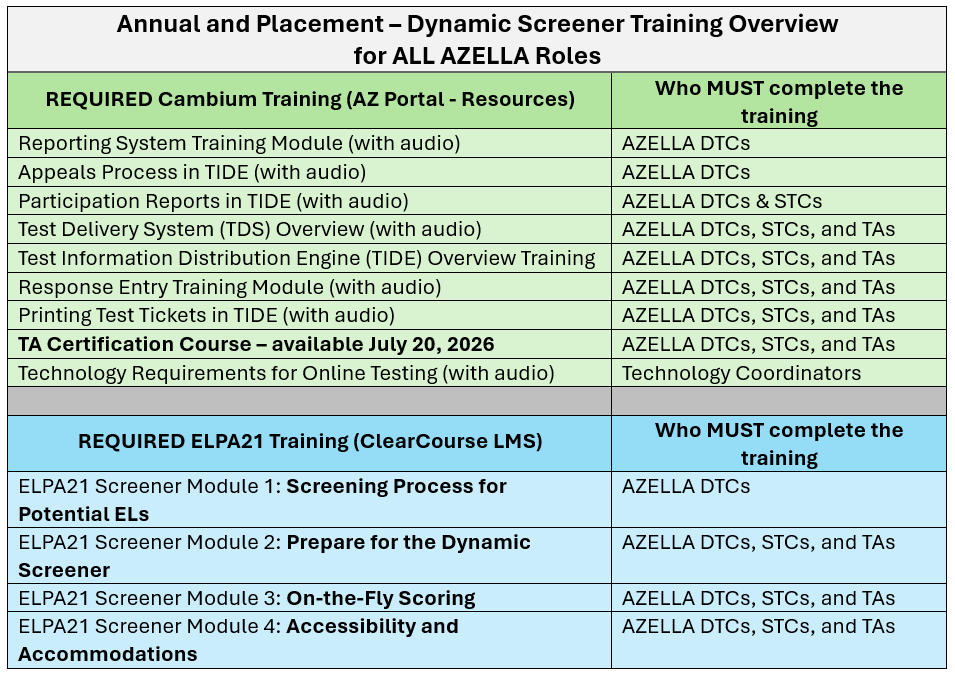
There are four parts to AZELLA training that may be completed in any order, but they must be completed prior to administering the AZELLA to students. Cambium will provide the online training modules for the District Test Coordinators, School Test Coordinators, and Test Administrators. All AZELLA staff must sign the 2026-2027 AZELLA Test Security Agreement prior to any AZELLA tests being administered.
Part 1: DTC Created Training for Staff
Before the administration of the AZELLA begins, the AZELLA DTC is responsible for creating and delivering a Placement Test Administration training presentation that is reflective of the state’s and the district’s testing policy and procedures, test security and ethics, protocols for safeguarding materials, student privacy, testing irregularities and security and ethics violations, AZELLA chain of command, test materials, testing schedules, and more. All district and school AZELLA staff, including School Test Coordinators, Test Administrators, and Proctors are required to participate in the training activity. Attendance rosters with signatures are required. If needed, this presentation may be shared virtually. There must be one session for the AZELLA Placement - Dynamic Screener and another session for the Spring AZELLA Reassessment - Summative.
Part 2: ClearCourse LMS - ELPA21 Courses
The AZELLA training courses are in Cambium’s new ClearCourse Learning Management System (LMS). The ClearCourse LMS tile (link) can be found in Cambium's AZ Portal and then click on the Test Administrator box on the left side of the screen. Test Administration Manuals (TAMs) for AZELLA will be available as a resource on July 20, 2026
- Placement - Dynamic Screener
- ELPA21 Screener Module 1: Screener Process for Potential ELs
- ELPA21 Screener Module 2: Prepare for the Dynamic Screener.
- ELPA21 Screener Module 3: On-the-Fly Scoring
- ELPA21 Screener Module 4: Accessibility and Accommodations
- Reassessment - Summative
Part 3: Cambium PowerPoint Trainings
These PowerPoints are available in Cambium's AZ Portal > Resources section. They may be downloaded and viewed. These are valuable for the day-to-day tasks of test management, student registrations, and monitoring test progress, etc.
- Reporting System Training Module
- Test Information Distribution Engine (TIDE) Overview Training
- Response Entry Training Module
- Printing Test Tickets in TIDE
- Appeals Process in TIDE (test irregularities)
- Participation Reports in TIDE
- Test Delivery System (TDS) Overview
Part 4: Test Administrator Certification Course
Starting on July 20, 2026, the required online TA Certification Course will be available in Cambium's AZ Portal under the Test Administrator box. DTCs, STCs, and TAs access the online TA Certification Course using the same user credentials they use to access the test administration system. This is a required self-paced course that includes detailed instructions on creating and managing test sessions, monitoring student activity, setting accommodations, and implementing test security measures. This course is designed to familiarize TAs, DTCs, and STCs with the Student Interface, the TA Interface, the approval process, and the tools students use during testing. To ensure that TAs have learned the skills necessary to administer tests using the new online system, each user must complete the course, pass a quiz, and sign a test security agreement form before being permitted to sign in to the online testing system. This course must be completed once per school year.
Presentations and Useful Web Links
Presentations
- July 14, 2026 - Pep Rally with ADE, Cambium Assessment, Inc., and ELPA21
- Video
- (Presentation Slides)
- June 16, 2026 - AZELLA Information for School Year 2026-2027
-
April 8, 2026 - AZELLA Reassessment Adjustments for Spring 2026
-
Navigating English Language Proficiency Report and Protecting Student Identifiable Information 12/10/2024
Useful Web Links
-
PearsonAccess Next - AZELLA test management system (closing for AZELLA on September 30, 2026)
-
Office of English Language Acquisition Services (OELAS) (EL Program Service Models, Compliance Issues, FEP Monitoring, OELAS EL Forms, Title III, SEI Budget, and the EL71 Report Information)
-
Contact ADE's Assessments - AZELLA Team with all inquiries about AZELLA and ELP results [email protected]
-
Contact Information
Contact Information
ADE's Assessments AZELLA Inbox ([email protected]) should be your first contact concerning English Language Proficiency (ELP) assessment questions. All questions concerning training modules, test administration, students eligible and required to test, test administration schedules, test irregularities, ELP test records, issues with the EL70, EL72, and EL73 Reports, and any issues that arise during test administration should be sent to the AZELLA Inbox. Our team is able to respond to you much faster through email. We strive to respond within 1 business day to all emails and voicemails. ADE is closed on the weekends and all holidays.
High Importance – For issues that arise during actual student testing, send an email to the AZELLA Inbox and indicate in the subject line “Students Testing – Need Help.” Mark your email with a High Importance tag. Include a phone number that we can contact with you at if necessary. In the email, include:
- the student's SSID number,
- grade level,
- the district and school information,
- any error message or code(s) that the student or TA is receiving, and
- information about the situation is required.
ADE will respond as quickly as possible. Do not leave a voice message, as these calls are not responded to as quickly as emails.