February Data Capture Reminder

February Data Capture Reminder

February's data capture for the March payment is scheduled for 2/8/22 at 5pm. Please ensure you’ve reconciled your data prior to data capture as payments will be based on data in AzEDS.

Please review and reconcile your SIS data against the following reports in AzEDS:

INTEG15 – free and clear of membership ADM Integrity errors

STUD10 – validate that all of your students have landed in AzEDS

ADM15 – ensure all students expected to generate funding are indicated as fundable

ADM20, SPED20, and EL20 – ensure that your ADM is what you expect for each ADM type

The following videos provide general information related to the data reconciliation process:

Introduction to Data Verification Reports: https://youtu.be/ou9Jst9qnsg

Introduction to Data Verification Reports 2: https://youtu.be/_m3uEo3OGRI

Introduction to Integrity: https://youtu.be/PYzBAEZmiSs

Your prior payment reports can be found here: https://schoolfinancereports.azed.gov/.

Please submit a School Finance HelpDesk ticket if you need assistance with your data.

Additionally, please note that the timing of payment data capture dates will be modified beginning in FY23 per House Bill 2898 as shared in a recent Hot Topic

Website Update Announcement

Website Update Announcement

Mon, Jan 24, 2022

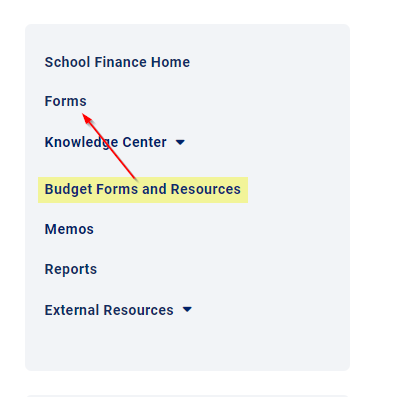
We are cleaning up the School Finance website to make it easier to navigate and find information. You can now access all Budget Forms and Resources by clicking on “Forms” on the navigation menu on the right side of the website

Website Update 1.png

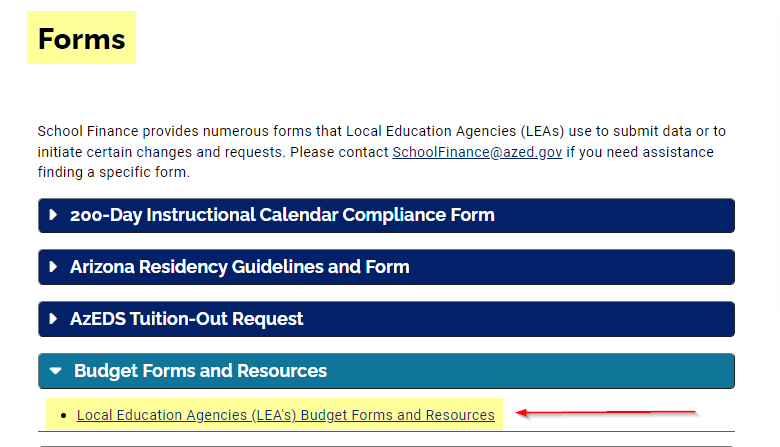
and then opening the "Budget Forms and Resources" dropdown.

Website Update 2.png

If you have any questions or need assistance finding a specific form or report, please email School Finance at [email protected].

FY 2022 January Expenditure Reports (BUDG-25)

FY 2022 January Expenditure Reports (BUDG-25)

BUDG-25 reports for all school districts have been posted to the School Finance website.  FY 2022 January BUDG-25 reports have been calculated using the FY 2021 BUDG-75 report and January BSA 55-1 informationPlease note, the reduction for any over-expenditure amount in M&O and/or Unrestricted as reported on the FY 2021 BUDG-75 will be included on the FY 2022 January BUDG-25 Reports.

  • District BUDG-25 reports are available to download from the School Finance website:
    • First, select a school district and then click “Go!”
    • Next, click “Switch to Budgets” from the top right corner of the menu bar and then click “Reports” from the middle of the menu bar.
    • Finally, select fiscal year 2022 and then click “Go!”. The BUDG-25 report will appear.
  • District BUDG-75 reports are available to download from the School Finance website:
    • First, select a school district and then click “Go!”
    • Next, click “Switch to Budgets” from the top right corner of the menu bar and then click “Reports” from the middle of the menu bar.
    • Finally, select fiscal year 2021 and then click “Go!”. The BUDG-75 report will appear.

Please note, BUDG-75 reports have been updated and Budget Balance Carry Forward amounts have been recalculated based on FY21 AFR.

  • District BSA 55-1 reports are available to download from the School Finance website:
    • First, select a school district and then click “View Reports”
    • Next, scroll down the page to the “School District Reports” section.
    • Finally, click the November “PDF” button. The January BSA 55-1 report will appear. 

BUDG-25 reports will be available until the Budget Team performs the next update (typically after each State Aid distribution). Once the updating process has begun, all BUDG-25 reports will become unavailable at that time.  Please save a copy for future reference.

Please contact the Budget Team ([email protected]) if you have any questions.

Thank you!

Superintendent's Annual Financial Report (SAFR) 2021 & Database Posted

Superintendent's Annual Financial Report (SAFR) 2021 & Database Posted

The FY2021 Superintendent's Annual Financial Report (SAFR) has been posted. 

The perpetual SAFR database has been updated to include FY2021 (now encompassing 2006-2021).

The Superintendent's Annual Financial Reports and Database can both be found on the School Finance Reports page.

Please contact the Budget Team ([email protected]) if you have any questions.

Thank you!

Website Update Announcement

Website Update Announcement

Mon, Jan 3, 2022

We are cleaning up the School Finance website to make it easier to navigate and find information. You can now access all forms and reports by clicking on “Forms” or “Reports” on the navigation menu on the right side of the website and then selecting the desired report or form.

For example, student count and basic state aid reports are now available by clicking on "Reports" in the menu on our home page:

and then opening the "Student Counts and State Aid Reports" dropdown.

If you have any questions or need assistance finding a specific form or report, please email School Finance at [email protected].

FY 2022 December Expenditure Reports (BUDG-25)

FY 2022 December Expenditure Reports (BUDG-25)

BUDG-25 reports for all school districts have been posted to the School Finance website.  FY 2022 December BUDG-25 reports have been calculated using the December BSA 55-1 information.

  • District BUDG-25 reports are available to download from the School Finance website:
    • First, select a school district and then click “Go!”
    • Next, click “Switch to Budgets” from the top right corner of the menu bar and then click “Reports” from the middle of the menu bar.
    • Finally, select fiscal year 2022 and then click “Go!”. The BUDG-25 report will appear.
  • District BSA 55-1 reports are available to download from the School Finance website:
    • First, select a school district and then click “View Reports”
    • Next, scroll down the page to the “School District Reports” section.
    • Finally, click the December “PDF” button. The December BSA 55-1 report will appear.

BUDG-25 reports will be available until the Budget Team performs the next update (typically after each State Aid distribution). Once the updating process has begun, all BUDG-25 reports will become unavailable at that time.  Please save a copy for future reference.

Please contact the Budget Team ([email protected]) if you have any questions.

Thank you!

FY 2022 November Expenditure Reports (BUDG-25)

FY 2022 November Expenditure Reports (BUDG-25)

BUDG-25 reports for all school districts have been posted to the School Finance website.  FY 2022 November BUDG-25 reports have been calculated using the November BSA 55-1 information.

  • District BUDG-25 reports are available to download from the School Finance website:
    • First, select a school district and then click “Go!”
    • Next, click “Switch to Budgets” from the top right corner of the menu bar and then click “Reports” from the middle of the menu bar.
    • Finally, select fiscal year 2022 and then click “Go!”. The BUDG-25 report will appear.
  • District BSA 55-1 reports are available to download from the School Finance website:
    • First, select a school district and then click “View Reports”
    • Next, scroll down the page to the “School District Reports” section.
    • Finally, click the November “PDF” button. The November BSA 55-1 report will appear.

BUDG-25 reports will be available until the Budget Team performs the next update (typically after each State Aid distribution). Once the updating process has begun, all BUDG-25 reports will become unavailable at that time.  Please save a copy for future reference.

Please contact the Budget Team ([email protected]) if you have any questions.

Thank you!

School-Level AFR Formatting Error

School-Level AFR Formatting Error

We are aware that some LEAs are experiencing formatting errors when uploading their School-Level AFR files.  If your LEA is receiving errors related to the Totals tab, please follow the steps below:

  1. Open your School-Level AFR file
  2. Copy all information on the Totals tab
  3. Paste all information back on the Totals tab as a value
  4. Save your School-Level AFR file
  5. Using Common Logon, upload your file.

We apologize for the inconvenience.

Instructional Time Model (ITM) FAQ and Template - Updated 8/31/2021

Instructional Time Model (ITM) FAQ and Template - Updated 8/31/2021

HB 2862 allows a school district or charter to adopt an Instructional Time Model (ITM) to meet instructional hour requirements through things like remote instruction, project-based learning, mastery-based learning, weekend courses, and evening courses.

School districts and charters should use the Instructional Time Model Template for School Districts and Charter Schools to report Instructional Time Models to the department.

For more information about ITMs, please review School Finance – Initial Guidance on HB 2862 and the Instructional Time Model (ITM): Frequently Asked Questions document (updated as of August 31, 2021)Additionally, we held an ITM webinar on 8/12 and you can view a video recording of the webinar at this link

FY2021 In-Person, Teacher-Led Instruction Reporting FAQ's

FY2021 In-Person, Teacher-Led Instruction Reporting FAQ's

Note: The FAQ from this Hot Topic was revised on 4/12/2022 to add information from the Governor's Office regarding this program

Districts and charters are required to report to ADE the number of days of in-person, teacher-led instruction that were offered to all students during the 2020-2021 school year. We understand that the Governor’s Office intends to use the reported data to allocate funds this fall and therefore it is imperative that all districts and charters complete the required reporting.

Please see the reporting instructions in the original email from ADE to school leaders below. The original message is followed by the answers to frequently asked questions about this requirement.

---------------------------------------------------------

Dear School Leaders, 


As passed by the state legislature, the Arizona Department of Education is required to collect information on whether LEAs offered in-person, teacher-led instruction for at least 100 days of the 2020-2021 school year. 


"School districts and charter schools in this state shall report to the Department of Education whether they offered in-personteacher-led instruction for at least 100 days of the 2020-2021 school year, except that school districts and charter schools with fewer than 180 days of instruction pursuant to section 15-341.01, Arizona Revised Statutes, shall report whether they offered in-personteacher-led instruction for an equivalent proportion of instructional days. The report shall delineate the number of days of in-personteacher-led instruction that was offered by the school site.” - Laws 2021, Chapter 404, Section 108 


The Department is required to submit a report to the Joint Legislative Budget Committee and the Governor’s Office of Strategic Planning and Budgeting that compiles the reported information above. 


This communication is to ask you to please submit the following information for all schools in your LEA no later than July 28, 2021. In order to complete the form, you will need to download and complete the In-Person, Teacher-led Instruction Reporting template and upload it into the form. You will also need your Entity ID, which can be found here


Please Contact ADE School Finance with any questions at [email protected] 

--------------------------------------------------

Frequently Asked Questions:

Note: 

Click here to determine which schools the Governor's Office has determined are eligible for funding.

Click here for information about the funding program.

Q: Should days on which only on-site support services were offered be included?

A: No, please report the total number of instructional days that all students were offered the option to attend in-person, teacher-led instruction.

Q: If the school was providing in-person, teacher-led instruction for special education students only. Should that count as a day of in-person, teacher-led instruction?

A: No, please report the total number of instructional days that all students were offered the option to attend in-person, teacher-led instruction.

Q: Do summer camp numbers count towards this report?

A: No, please report the number of instructional days during the school year that all students had the option to attend in-person, teacher-led instruction.

Q: At several of our sites, we offered hybrid models in which groups of students attended in-person instruction on specific days of the week. For example, for a portion of the year, any given student attended in-person instruction one day per week although the campus was open for in-person instruction four days per week. In this model, should we report one day of in-person instruction each week or four days each week?

A: In this model, you would report four days of in-person instruction per week to report the number of instructional days that the school offered the option to attend in-person.

Q: Our hybrid model consisted of morning and afternoon groups. Over the course of the week, each student attended in person for five half-days (with the other half consisting of remote instruction while the opposite group attended in person). Should this be reported as 2.5 days of in-person instruction for the week or five days of in-person instruction?

A: In this model, you would report five days of in-person instruction. It is not necessary to report or adjust for the length of each instructional day.

Q: Can one file be submitted for all LEAS or does it need to be submitted by individual school?

A: One file should be submitted for each LEA, but the file can include information for all schools within the LEA.

Q: Our district successfully uploaded the in-person, teacher-led instruction reporting for SY2020-2021, but we also received an error message. We would like to confirm that the data has been received or if we would need to re-submit.

A: Please email [email protected] to confirm that the report has been received.

Q: I uploaded and submitted incorrect reports, can you archive the incorrect reports so I can upload the correct ones?

A: Yes, please email [email protected] and request that the incorrect reports be deleted. After the incorrect reports are deleted, you will be able to resubmit new reports.