Path
finance
Contact
Contact name or title
School Finance Main Line
Contact phone number
(602) 542-5695

Website Update Announcement

Website Update Announcement

Mon, Jan 24, 2022

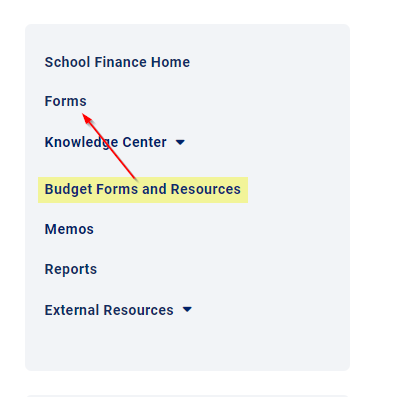
We are cleaning up the School Finance website to make it easier to navigate and find information. You can now access all Budget Forms and Resources by clicking on “Forms” on the navigation menu on the right side of the website

Website Update 1.png

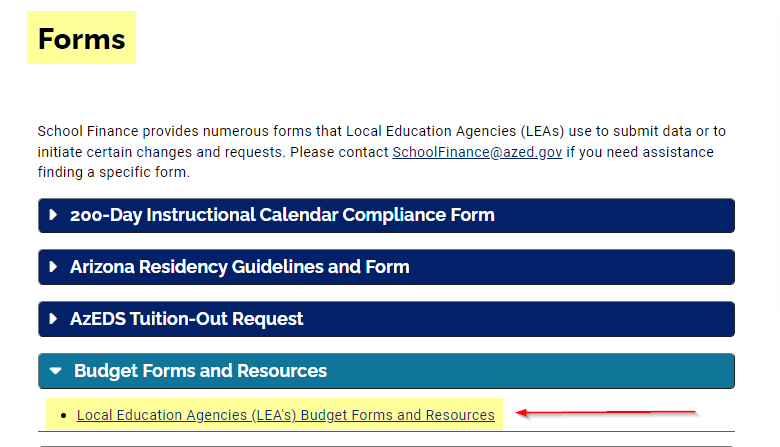
and then opening the "Budget Forms and Resources" dropdown.

Website Update 2.png

If you have any questions or need assistance finding a specific form or report, please email School Finance at [email protected].

FY 2022 January Expenditure Reports (BUDG-25)

FY 2022 January Expenditure Reports (BUDG-25)

BUDG-25 reports for all school districts have been posted to the School Finance website.  FY 2022 January BUDG-25 reports have been calculated using the FY 2021 BUDG-75 report and January BSA 55-1 informationPlease note, the reduction for any over-expenditure amount in M&O and/or Unrestricted as reported on the FY 2021 BUDG-75 will be included on the FY 2022 January BUDG-25 Reports.

  • District BUDG-25 reports are available to download from the School Finance website:
    • First, select a school district and then click “Go!”
    • Next, click “Switch to Budgets” from the top right corner of the menu bar and then click “Reports” from the middle of the menu bar.
    • Finally, select fiscal year 2022 and then click “Go!”. The BUDG-25 report will appear.
  • District BUDG-75 reports are available to download from the School Finance website:
    • First, select a school district and then click “Go!”
    • Next, click “Switch to Budgets” from the top right corner of the menu bar and then click “Reports” from the middle of the menu bar.
    • Finally, select fiscal year 2021 and then click “Go!”. The BUDG-75 report will appear.

Please note, BUDG-75 reports have been updated and Budget Balance Carry Forward amounts have been recalculated based on FY21 AFR.

  • District BSA 55-1 reports are available to download from the School Finance website:
    • First, select a school district and then click “View Reports”
    • Next, scroll down the page to the “School District Reports” section.
    • Finally, click the November “PDF” button. The January BSA 55-1 report will appear. 

BUDG-25 reports will be available until the Budget Team performs the next update (typically after each State Aid distribution). Once the updating process has begun, all BUDG-25 reports will become unavailable at that time.  Please save a copy for future reference.

Please contact the Budget Team ([email protected]) if you have any questions.

Thank you!
Superintendent's Annual Financial Report (SAFR) 2021 & Database Posted

Superintendent's Annual Financial Report (SAFR) 2021 & Database Posted

The FY2021 Superintendent's Annual Financial Report (SAFR) has been posted. 

The perpetual SAFR database has been updated to include FY2021 (now encompassing 2006-2021).

The Superintendent's Annual Financial Reports and Database can both be found on the School Finance Reports page.

Please contact the Budget Team ([email protected]) if you have any questions.

Thank you!

Transportation Routes Now Open for FY22

Transportation Routes Now Open for FY22

Mon, Jan 10, 2022

Districts (not charters) are required to submit transportation route data within 12 days of their 100th day (or 200th day where applicable) per A.R.S. § 15-922. Beginning in FY22, School Finance will be collecting transportation data from districts via a new ADEConnect application. Users who submit transportation data must be assigned the role of “TransportationInventory – LEA User” in ADEConnect to access the new Transportation and Vehicle Inventory application. ADE IT has assigned the new role to every ADEConnect user who was assigned either the Transportation Routes or Vehicle Inventory role in Enterprise. If no user for an LEA was assigned those roles in Enterprise, then ADE IT assigned the ADEConnect role to the Entity Administrator. Entity Administrators can assign this role to users in ADEConnect. Please contact your Entity Administrator if you need assistance with role assignment.

The following resources have been created to assist in submitting transportation data via the new application:

Please review these resources prior to submitting your transportation data. If additional assistance is needed, please submit a HelpDesk ticket.

Website Update Announcement

Website Update Announcement

Mon, Jan 3, 2022

We are cleaning up the School Finance website to make it easier to navigate and find information. You can now access all forms and reports by clicking on “Forms” or “Reports” on the navigation menu on the right side of the website and then selecting the desired report or form.

For example, student count and basic state aid reports are now available by clicking on "Reports" in the menu on our home page:

and then opening the "Student Counts and State Aid Reports" dropdown.

If you have any questions or need assistance finding a specific form or report, please email School Finance at [email protected].

FY 2022 December Expenditure Reports (BUDG-25)

FY 2022 December Expenditure Reports (BUDG-25)

BUDG-25 reports for all school districts have been posted to the School Finance website.  FY 2022 December BUDG-25 reports have been calculated using the December BSA 55-1 information.

  • District BUDG-25 reports are available to download from the School Finance website:
    • First, select a school district and then click “Go!”
    • Next, click “Switch to Budgets” from the top right corner of the menu bar and then click “Reports” from the middle of the menu bar.
    • Finally, select fiscal year 2022 and then click “Go!”. The BUDG-25 report will appear.
  • District BSA 55-1 reports are available to download from the School Finance website:
    • First, select a school district and then click “View Reports”
    • Next, scroll down the page to the “School District Reports” section.
    • Finally, click the December “PDF” button. The December BSA 55-1 report will appear.

BUDG-25 reports will be available until the Budget Team performs the next update (typically after each State Aid distribution). Once the updating process has begun, all BUDG-25 reports will become unavailable at that time.  Please save a copy for future reference.

Please contact the Budget Team ([email protected]) if you have any questions.

Thank you!
Instruction Manuals

This page contains instruction manuals that explain the various systems used by local education agencies (LEAs) to submit school, staff, and transportation data to School Finance. The manuals provide guidance in navigating the various systems to successfully submit data. 

FY 2022 November Expenditure Reports (BUDG-25)

FY 2022 November Expenditure Reports (BUDG-25)

BUDG-25 reports for all school districts have been posted to the School Finance website.  FY 2022 November BUDG-25 reports have been calculated using the November BSA 55-1 information.

  • District BUDG-25 reports are available to download from the School Finance website:
    • First, select a school district and then click “Go!”
    • Next, click “Switch to Budgets” from the top right corner of the menu bar and then click “Reports” from the middle of the menu bar.
    • Finally, select fiscal year 2022 and then click “Go!”. The BUDG-25 report will appear.
  • District BSA 55-1 reports are available to download from the School Finance website:
    • First, select a school district and then click “View Reports”
    • Next, scroll down the page to the “School District Reports” section.
    • Finally, click the November “PDF” button. The November BSA 55-1 report will appear.

BUDG-25 reports will be available until the Budget Team performs the next update (typically after each State Aid distribution). Once the updating process has begun, all BUDG-25 reports will become unavailable at that time.  Please save a copy for future reference.

Please contact the Budget Team ([email protected]) if you have any questions.

Thank you!

School-Level AFR Formatting Error

School-Level AFR Formatting Error

We are aware that some LEAs are experiencing formatting errors when uploading their School-Level AFR files.  If your LEA is receiving errors related to the Totals tab, please follow the steps below:

  1. Open your School-Level AFR file
  2. Copy all information on the Totals tab
  3. Paste all information back on the Totals tab as a value
  4. Save your School-Level AFR file
  5. Using Common Logon, upload your file.

We apologize for the inconvenience.

Instructional Time Model (ITM) FAQ and Template - Updated 8/31/2021

Instructional Time Model (ITM) FAQ and Template - Updated 8/31/2021

HB 2862 allows a school district or charter to adopt an Instructional Time Model (ITM) to meet instructional hour requirements through things like remote instruction, project-based learning, mastery-based learning, weekend courses, and evening courses.

School districts and charters should use the Instructional Time Model Template for School Districts and Charter Schools to report Instructional Time Models to the department.

For more information about ITMs, please review School Finance – Initial Guidance on HB 2862 and the Instructional Time Model (ITM): Frequently Asked Questions document (updated as of August 31, 2021)Additionally, we held an ITM webinar on 8/12 and you can view a video recording of the webinar at this link