Path
adultedservices
Contact

State Provided Online Curricula for Adult Education

State Provided Online Curricula for Adult Education

Online curricula provided for WIOA Title II Adult Education programs.

BurlingtonEnglish

Training Options

Burlington offers asynchronous self-paced training and synchronous virtual training. To request either, please reach out to [email protected].

Burlington's Podcast Series - Rise to the Challenge

Link to the Burlington English podcast page.

Tune in for practical teaching strategies, classroom management tips, lesson planning ideas, and more!

Real-life success stories and best practices from programs nationwide for overcoming challenges with English language learning for adults. Each short episode delivers actionable insights, perfect for busy educators and administrators.

Have a listen to Burlington's new podcast series: Burlington's Podcast Series - Rise to the Challenge

Monthly Burlington Boosts

Join us for November's series: "Decoding Data"

BrulingtonEnglish Office Hours

Have questions about Burlington English? Need help learning a new feature or a refresher on how to do something? Join Corey during BurlingtonEnglish Office Hours for support, tips, and answers to your questions!

Office Hours are November 20th following Burlington Boost! Register for BurlingtonEnglish Office Hours

Tips for Success

Watch this informational video to learn more about Burlington Core's Online Module Tests.

Burlington Core Scope and Sequence

Take a moment to look at the Burlington Core Scope and Sequence!

Essential Education

Training Options

Reach out to [email protected] to request training or check out the Training and Free Resources tab in the LMS.

Asynchronous Training Videos

  • TABE integration video (7 min.)
  • The Training for Teachers videos will teach you how to log in and quickly get started using the Learning Management System (LMS) introduce the basics of the diagnostic reports available to you and how to use them and the Content Maps.

Tips for Success

Adult Education Proxy Models

Adult Education Proxy Models

Proxy models for Adult Education

Proxy Hours refer to any out-of-class (asynchronous) hours of instruction adhering to either the Clock Time Model, Teacher Verification Model, or the Learner Mastery Model.

Clock-Time Model

How it works:

Automatically tracks student's time-on-task and can generate reports showing student usage over a period of time.

ADE Approved Curricula

  1. ALEKS (MHC)
  2. Aztec Software
  3. BurlingtonEnglish
  4. Edmentum
  5. EdReady
  6. Ellii
  7. EnGen
  8. Essential Education
  9. ESL ReadingSmart
  10. IXL Learning
  11. Khan Academy
  12. Learning Upgrade
  13. McGraw-Hill HSE Achieve
  14. Northstar Digital Literacy
  15. Odysseyware
  16. Rosetta Stone
  17. Skills Tutor

Learner Mastery Model

How it works:

Assigns a fixed number of proxy hours once the learner passes a test.

  1. Learners work in a curriculum; when they feel ready, take a test.
  2. If they demonstrate mastery (typically 70% & up), they earn the proxy hours attached to the material.

ADE Approved Curricula

  1. USA Learns
  2. NROC LMS installed courses (Math & English)
  3. Reading Skills for Today's Adults

See the WIOA Title II Local Provider Technical Assistance Guide (PTAG) for more information.

Teacher Verification Model

How it works:

Assigns a predetermined number of proxy hours for each assignment based on teacher determination of the average time a learner engaged in, or completed, the assignment.

Examples of Eligible Resources

Courses created in LMS (such as Canvas, Blackboard, Moodle), YouTube instructional videos, recorded lectures, etc.

Steps for the TVM

STEP 1: Required Course

Blended Learning Certification (TVM Requirement)

This course will ensure your understanding of blended learning as an instructional model to use the TVM effectively. Then, it will walk through the processes for earning/reporting attendance hours through the Teacher Verification Model. It will conclude with a capstone to demonstrate your understanding of the TVM process. Register here.

*Successful completion = receiving a Certificate of Completion for the course which must be kept on file at the program (digitally or physically).

STEP 2: Submit a Lesson to the TVM Repository

  • After you have successfully completed* the Blended Learning Certification course, submit a lesson for the TVM using this template.
  • Check out the new Airtable Form video walkthrough to see the template for submitting lessons in action and ensure your submission can be effectively used by other AZ Adult Educators.

STEP 3: Explore the Statewide Lesson Repository

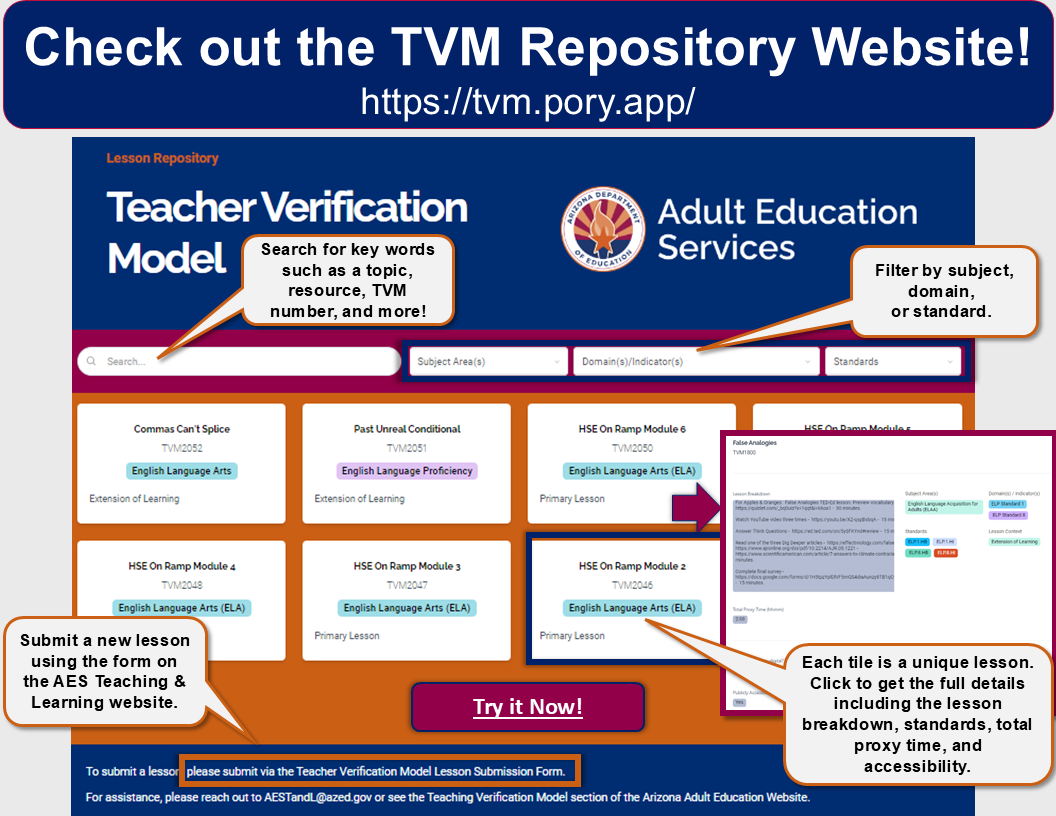
TVM Website Repository!

Click the image to visit the lesson repository or visit tvm.pory.app.

TVM Pory Screnshot highlighting a search bar for keywords, filters for content by subject, domain, or standards, instructions to submit a new lesson at the bottom of the page, and an example of each card item expanding into a pop out.

Digital Literacy Resources

Digital Literacy Resources

Resources for Digital Literacy Instruction

Internet Resources and Lending Programs

Assessments and Curricula

  • Northstar Digital Literacy has NSOL platform courses freely available at the moment, including: Basic Computer Skills, Email, Microsoft Word, and Career Search Skills.
  • Digital Skills Library is an open repository of free learning resources designed to help all adult learners develop the digital skills needed to achieve their personal, civic, educational, and career goals.
  • Google Applied Digital Skills for students to learn job-ready skills with video-based lessons, free.

Courses for Instructors

Blended, Virtual, HyFlex Resources

Blended, Virtual, HyFlex Resources

Resources for Blended, Virtual, and HyFlex learning.

Monthly Tech Tip

We are happy to bring you monthly Tech Tips for quick and fun helpful hints, new ideas, and ways to troubleshoot. All will be placed into a Padlet for your convenience; bookmark the page to get the latest updates! Each tip can be printed to post around your facility or emailed out to other faculty and staff! We are happy to take requests for topics, reach out to [email protected] with your ideas.

Blended and Distance Learning

  • Learner Variability Navigator is a tool that allows you to select the factors that may affect your students' learning and offers appropriate strategies to support those factors.
  • BRIDGES from World Education is a great place to discover strategies, resources, and activities to support meaningful edtech integration and digital skill development.

HyFlex Learning

  • EdTech Center @ World Education's HyFlex guide and video series! Review the Guide for Design and Implementation of Hybrid-Flexible (HyFlex) Models in Adult Education for information and examples for HyFlex program and instructional planning, teaching strategies, program evaluation, and technology. It also includes 10 program vignettes that share how adult education programs are offering HyFlex for adult learners - featuring one of AZ's own!
  • Check out this infographic to learn a bit more about what it entails and how to get started.
  • HyFlex Choice Board! Check out the HyFlex Choice Board Google Doc to learn about engagement strategies, technology tips, and more!

Instructional Resources

Instructional Resources


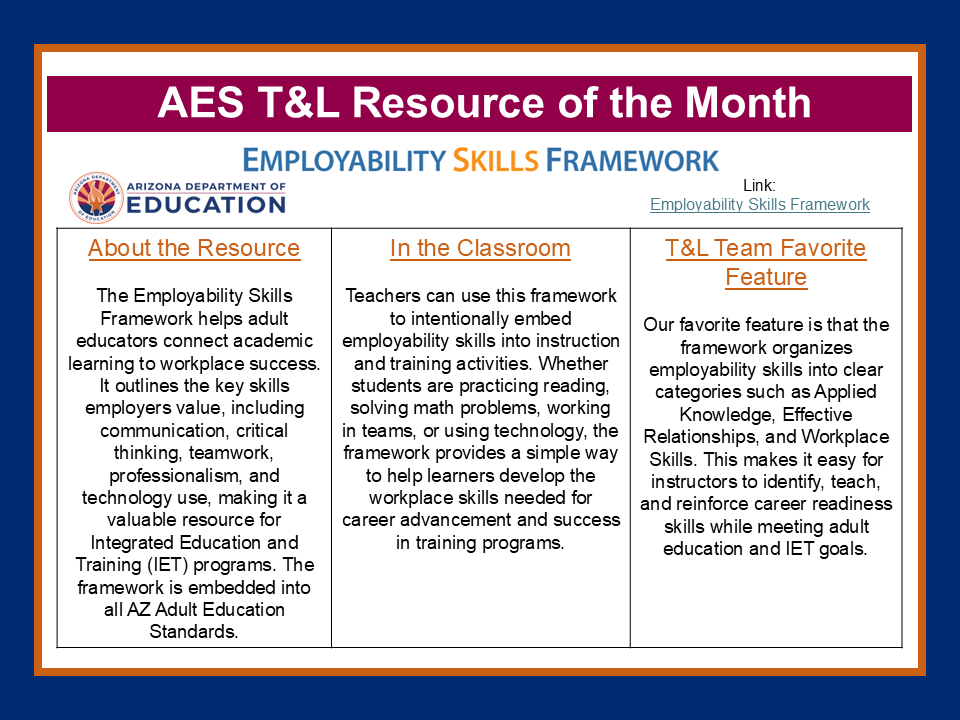
The Employability Skills Framework helps educators teach workplace readiness skills by connecting classroom learning to employer expectations, including communication, critical thinking, teamwork, professionalism, and technology use. The framework supports career preparation and organizes skills into categories that help learners succeed in education, training, and the workplace.


AES Teaching & Learning Resources


Arizona Adult Education Standards

Arizona Adult Education Standards

Standards for Adult Education

Logo for the ADE Passport website for standards.

Arizona Adult Education Certification

Arizona Adult Education Certification

Arizona Adult Education Credentials

Arizona Adult Education Certification

Arizona Adult Education Proficiency Assessments

High School Equivalency Services

High School Equivalency Services

! Important: As of October 1, 2026, all GED Testing candidates will be required to present a valid U.S. government-issued ID in order to test.

Revised Arizona Jurisdictional Policy for GED Testing Candidates
Effective 10/1/2026

All GED® Testing candidates must provide a U.S. government-issued ID to test.

Additional requirements for 16-17 year-old individuals must be completed prior to scheduling the GED® Tests:

  • Official withdrawal from the last school attended.
  • Notarized and dated permission letter from a parent or guardian.
  • Current U.S. government-issued ID

All age authorizations for 16-17 year-old individuals must be submitted through the Arizona Department of Adult Education at [email protected].

*Requests may take up to 30 days for review.

The Arizona High School Equivalency Diploma, also known as the AZ HSE Diploma or simply HSE, is an equivalent high school diploma that is awarded by the State of Arizona as authorized by A.R.S. §15-702 and AZ Administrative Code R7-2-307.

The HSE is often called a GED®, however this is a common misconception. The GED® is the name of the company that owns and administers the GED® tests. The Arizona Department of Education is responsible for awarding the Arizona HSE Diploma to candidates who successfully complete one of the three AZ HSE Pathways.

GED®is not a HSE Diploma


There are 3 ways to earn an Arizona High School Equivalency Diploma. Click one of the buttons in the graphic below to learn more.

GED Testing Pathway

HSE Plus Pathway

College Credit Pathway

Please note that all three pathways require the candidate to pass the Arizona Civics Test with a minimum score of 70. A passing score from middle school or high school can be accepted, or the test can be scheduled on the MyGED.com student profile.

Frequently Asked Questions

What if I don't know which pathway I should take?

We recommend seeking additional assistance at one of the closest Adult Education Programs funded by the state. A list of programs is available here: Arizona Adult Education Programs.

What do I do when I finish a pathway?

Congratulations! Notify us that you finished at [email protected]!

High School Equivalency GED® Testing Pathway

High School Equivalency GED® Testing Pathway

Revised Arizona Jurisdictional Policy for GED Testing Candidates
Effective 10/1/2026

All GED® Testing candidates must provide a U.S. government-issued ID to test.

Additional requirements for 16-17 year-old individuals must be completed prior to scheduling the GED® Tests:

  • Official withdrawal from the last school attended.
  • Notarized and dated permission letter from a parent or guardian.
  • Current U.S. government-issued ID

All age authorizations for 16-17 year-old individuals must be submitted through the Arizona Department of Adult Education at [email protected].

*Requests may take up to 30 days for review.

In Arizona, there are three options to earn a High School Equivalency (HSE) Diploma, that have been approved by the AZ State Board of Education. To learn more about each of the pathways, please view the video in the link below.

The GED® Testing Pathway

Passing the GED® tests along with the AZ Civics Test is one way a High School Equivalency Diploma can be earned in Arizona. Millions of people have passed the GED® test and gone on to college and better jobs. You can be one of them. We will help you every step of the way.

Step 1: Register Your Profile

Register by creating your test-taker profile at the MyGED® website.

Step 2: Find a Test Location and Eligibility Requirements

Once you're logged into your profile, you will be able to find the most up to date GED® testing location near you by clicking on the "Where to Test" tab.

Requirements

All candidates are required to present a valid U.S. government-issued ID in order to test.

Additional requirements for 16- and 17-year-old individuals must be completed before being allowed to schedule the high school equivalency required tests:

  1. Must create a test-taker profile at GED.com using their full legal name.
  2. Must submit the three documents listed below to the Arizona Department of Education via email at [email protected]
    1. Official withdrawal from the last school attended.
    2. Notarized and dated permission letter from a parent or guardian.
      (Arizona High School Equivalency Parent/Guardian Permission of Minor Form)
    3. Current U.S. government-issued ID

Accommodations

If you have a documented disability and require accommodations during the testing session, read the frequently asked questions at the GED® Testing Service Accommodations website. To request testing accommodations, please follow the steps outlined in the Accommodations Guide. For questions regarding accommodations, please contact [email protected].

Step 3: Prepare for the GED® Test

Here are some recommended study techniques:

In-Person/Online Classes

State-Funded Adult Education programs offer classes that are designed to help you prepare for the high school equivalency test, please contact State-Funded Adult Education Programs directly for more information.

Study On Your Own

Self-study materials can be found on the GED® website. You may also want to check out your local public library for GED® study books to help you prepare for the GED® test.

GED Ready® Official Practice Test

The 2014 GED® official practice test is called GED Ready and is available at www.GED.com. Create and log into your MyGED account and then click on the Study tab. The practice test is designed to assess how likely you are to pass the test including personal feedback and recommendations to improve your score.

Step 4: Register for the GED® Tests

The GED® test is made up of four subjects and four tests. You don't have to take all tests at once - you can space them out and go at your own pace. Tests can be taken at a testing center (found in Step 2) or via the Online Proctored GED® Test.

Test Subjects

  • Reasoning Through Language Arts
  • Mathematical Reasoning
  • Science
  • Social Studies

Fees

  • In-person & Online testing is $41 per GED® test.
  • Payment is only necessary for the desired test being taken.
  • Payment includes the following:
    • Your GED® Test
    • Same-day scoring
    • A personalized score report
    • 1 discounted retake per subject (in-person only)*
    • Electronic Transcript and Diploma
  • *Nominal test center fees may still apply.

Note: If you have recently passed all four subjects of the GED Test and the AZ Civics Test, your Arizona High School Equivalency electronic diploma and electronic transcript will be automatically sent to the email address recorded in your MyGED® profile.

You can find more information on the Official GED® Test website.